What Assets Can You Trade on a Bitget CFD Demo Account? Forex, Gold, Commodities and Indices Explained (2026 Guide)
Want to practice trading gold, forex, or global stock indices without putting real money at risk? Bitget CFD Demo Trading makes that possible. Introduced in October 2026, the feature gives users 10,000 USDT in virtual funds and access to real-time market prices, allowing them to explore different financial markets and test trading strategies in a simulated environment.
So, what assets can you trade on a Bitget CFD demo account? The platform supports four main asset categories: forex, precious metals, commodities, and global stock indices. These include markets such as EUR/USD, gold (XAUUSD), crude oil, and Nasdaq-related indices. This guide explains the available asset types, how they work, and how to start practicing CFD trading on Bitget.
Key Takeaways
-
Bitget CFD Demo supports four main asset categories: You can practice trading forex, precious metals, commodities, and global stock indices using virtual funds.
-
Bitget offers a wide range of CFD instruments: Examples include EUR/USD, USD/JPY, gold (XAUUSD), crude oil (USOUSD), and NAS100. Individual demo instrument availability may vary.
-
Users receive 10,000 USDT in virtual funds: You can explore different markets, test trading strategies, and practice managing positions without risking real money.
-
Bitget CFD Demo provides real-time market data and trading tools: You can open long and short positions, set take-profit and stop-loss orders, and explore different trading modes.
-
CFD trading involves price speculation without asset ownership: You can practice trading market movements without purchasing the underlying currencies, metals, commodities, or stocks.
What Assets Can You Trade on a Bitget CFD Demo Account?
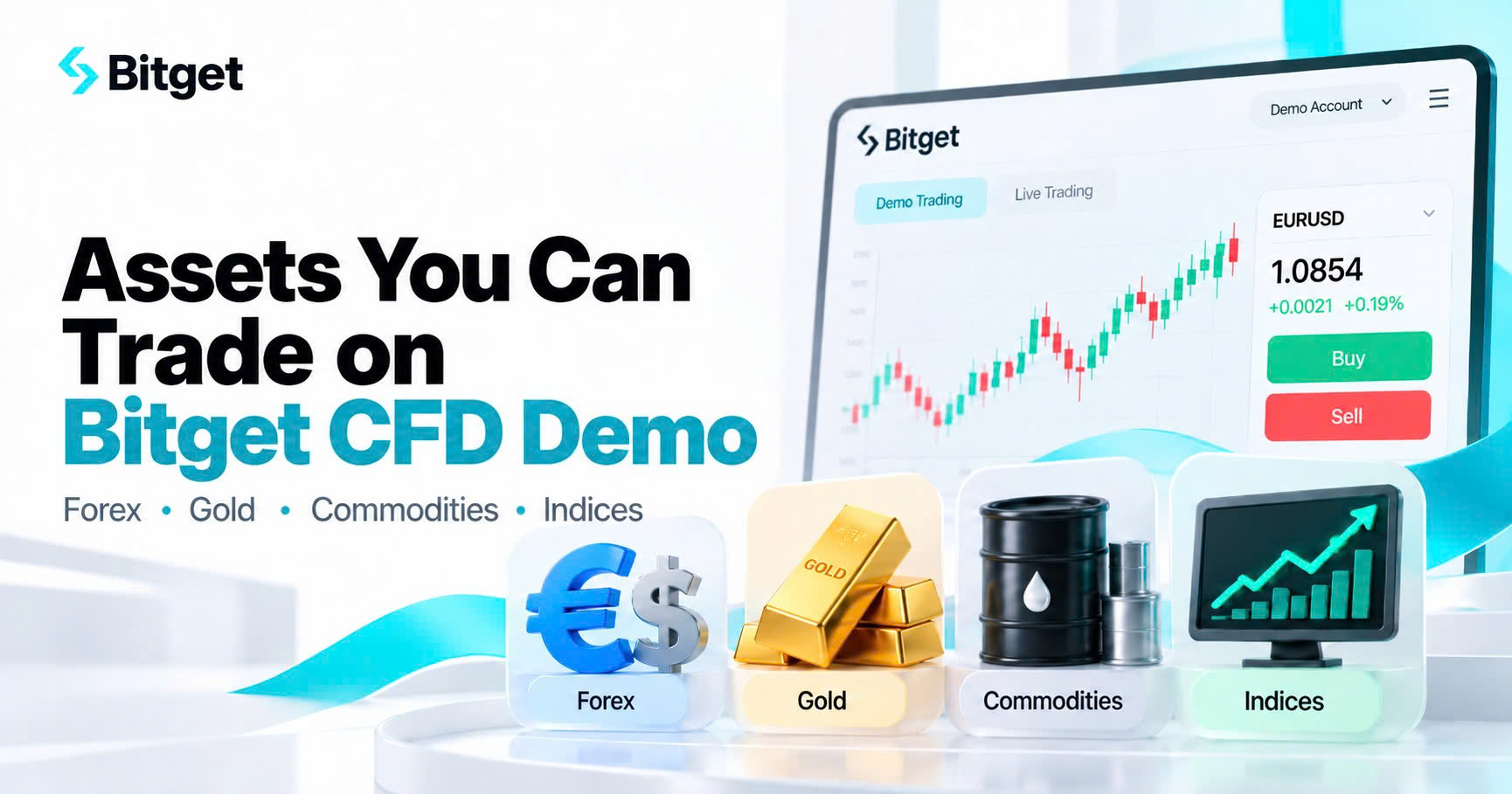
Bitget CFD Demo Trading supports forex pairs, precious metals, commodities, and global stock indices. Users can practice trading these markets using virtual funds and real-time prices, without buying or holding the underlying assets.
A Contract for Difference (CFD) is a financial derivative that allows traders to take positions based on an asset's price movement. Users can go long if they expect a price to rise or short if they expect it to fall. Profits and losses depend on the direction of the price movement, position size, and applicable trading costs.
According to the Bitget CFD demo account user guide, the platform provides real-time market data across four primary asset categories.
| Asset Category |
Examples on Bitget CFD |
What Users Can Practice |
| Forex |
EUR/USD, USD/JPY, GBP/USD |
Trading currency exchange-rate movements |
| Precious metals |
Gold (XAUUSD), silver (XAGUSD), platinum (XPTUSD) |
Trading metals prices and testing market strategies |
| Commodities |
WTI crude oil (USOUSD), Brent crude oil (UKOUSD), natural gas (NG), copper |
Exploring energy and commodity price movements |
| Global stock indices |
NAS100, US30, US500, HK50, JP225 |
Trading broader stock-market movements |
Note: These examples come from Bitget's published CFD instrument specifications. Availability of individual symbols in the demo account may change. Users should check the current instrument list in the demo trading interface.
One useful feature is the ability to explore different markets within the same simulated environment. For example, a user can practice a forex strategy, observe how gold responds to economic news, and compare those movements with a major stock index. Each market has different characteristics, making demo trading a practical way to understand how CFDs behave before using real capital.
What Forex Pairs Can You Trade on Bitget CFD Demo?
Bitget CFD Demo provides access to forex markets, allowing users to practice trading currency pairs based on changes in their exchange rates. Forex CFDs do not require users to purchase or exchange the underlying currencies.
According to Bitget's supported CFD trading pairs, examples include:
-
EUR/USD: Euro against the US dollar, one of the most widely followed currency pairs.
-
USD/JPY: US dollar against the Japanese yen, often influenced by monetary policy differences between the United States and Japan.
-
GBP/USD: British pound against the US dollar, which can react to UK and US economic developments.
-
AUD/USD: Australian dollar against the US dollar, often sensitive to commodity markets and global economic conditions.
-
USD/CAD: US dollar against the Canadian dollar, which can be influenced by oil prices and economic data.
Forex prices move in response to economic indicators, central bank decisions, interest rates, and market sentiment. Different currency pairs may also experience different levels of volatility and trading activity.
Example: Practicing EUR/USD Trading on Bitget CFD Demo
Suppose a trader expects the euro to strengthen against the US dollar following an economic announcement.
The trader opens a simulated long position on EUR/USD at 1.1000. If the exchange rate rises to 1.1050, the position moves favorably by 50 pips. If it falls instead, the position moves against the trader.
The actual simulated profit or loss depends on the position size and trading costs.
This example helps users understand how currency movements, trade direction, and position size interact. Since no real funds are involved, beginners can practice reading forex quotes and managing positions before considering live trading.
Can You Practice Gold and Precious Metals Trading on Bitget CFD Demo?
Yes. Gold and other precious metals are among the asset categories supported by Bitget CFD Demo Trading. Users can practice trading changes in metals prices without purchasing physical gold, silver, or other precious metals.
Gold is a widely followed financial market because its price is influenced by inflation expectations, interest rates, currency movements, and demand for safe-haven assets.
Bitget's broader CFD instrument list includes:
| Trading Symbol |
Underlying Market |
| XAUUSD |
Gold priced in US dollars |
| XAGUSD |
Silver priced in US dollars |
| XPTUSD |
Platinum priced in US dollars |
| XPDUSD |
Palladium priced in US dollars |
| XAUEUR |
Gold priced in euros |
Among these instruments, XAUUSD is a useful starting point for beginners interested in gold trading because it represents the value of gold relative to the US dollar.
Example: Practicing Gold (XAUUSD) Trading
Imagine a trader expects gold prices to rise following a shift in market expectations about US interest rates.
Using Bitget CFD Demo, the trader opens a simulated long position on XAUUSD and sets a take-profit level above the entry price and a stop-loss level below it.
If gold rises, the position may generate a virtual profit. If the price falls, the stop-loss may close the position at a simulated loss, subject to execution conditions.
The exercise allows users to observe how gold prices affect their positions while becoming familiar with margin requirements, leverage, and risk controls.
Gold can be volatile around important economic announcements. Practicing with virtual funds gives users an opportunity to study these movements without exposing real capital.
What Commodities Can You Trade on Bitget CFD Demo?
Bitget CFD Demo supports commodity markets, allowing users to practice trading price movements in energy and other raw materials.
Commodity prices are influenced by factors such as global supply and demand, production levels, weather conditions, economic activity, and geopolitical developments. Unlike forex or stock indices, individual commodities can respond strongly to industry-specific events.
Examples from Bitget's published CFD instrument list include:
-
WTI crude oil (USOUSD): A widely followed US crude oil benchmark.
-
Brent crude oil (UKOUSD): An international crude oil benchmark.
-
Natural gas (NG): An energy commodity affected by weather, storage levels, and energy demand.
-
Copper: An industrial metal linked to manufacturing, infrastructure, and economic activity.
-
Coffee and cocoa: Agricultural commodities influenced by weather, harvest conditions, and supply disruptions.
These instruments provide different opportunities for studying how commodity markets react to news and changes in economic conditions.
Example: Practicing Crude Oil Trading on Bitget CFD Demo
Suppose a trader expects crude oil prices to increase following reports of potential supply disruptions.
The trader selects WTI crude oil (USOUSD) in the demo account, checks the contract specifications, and opens a simulated long position.
If oil prices increase, the position gains value before applicable costs. If prices decline, the trader can observe how the loss affects the virtual balance and available margin.
The trader can also test alternative approaches, such as using a smaller position size or setting a tighter stop-loss level.
Commodity CFDs may have different contract sizes and trading sessions. Before practicing with a new instrument, users should review its specifications rather than assume the same settings apply across all markets.
Which Stock Indices Are Available on Bitget CFD Demo?
Bitget CFD Demo supports global stock index CFDs, allowing users to practice trading movements in major equity markets without buying individual company shares.
A stock index tracks the performance of a selected group of companies. For example, the Nasdaq-100 represents 100 of the largest non-financial companies listed on the Nasdaq Stock Market, while the SP 500 tracks a broad group of large US companies.
Bitget's published CFD lineup includes several major indices:
| Trading Symbol |
Index Market |
Market Exposure |
| NAS100 |
Nasdaq-100-related index |
Major US non-financial companies, with substantial technology exposure |
| US30 |
Dow Jones-related index |
Major US blue-chip companies |
| US500 |
SP 500-related index |
Broad US large-cap equity market |
| HK50 |
Hang Seng-related index |
Hong Kong equity market |
| JP225 |
Nikkei 225-related index |
Japanese equity market |
| AUS200 |
SP/ASX 200-related index |
Australian equity market |
Stock index CFDs are particularly useful for understanding how broader markets respond to economic data, corporate earnings, interest-rate decisions, and changes in investor sentiment.
Example: Practicing Nasdaq (NAS100) Trading
Consider a trader who expects US technology stocks to strengthen following positive corporate earnings.
Instead of purchasing individual stocks, the trader opens a simulated long position on NAS100 through Bitget CFD Demo.
If the index rises, the position moves favorably. If the market declines, the trader can review the effect of the movement on their virtual margin and profit or loss.
The trader can also practice a short position when expecting a market decline.
Importantly, trading NAS100 is different from owning shares in companies such as NVIDIA, Apple, or Microsoft. The CFD tracks price movements associated with the underlying index rather than providing ownership of the companies it represents.
How to Start Trading Different Assets on Bitget CFD Demo
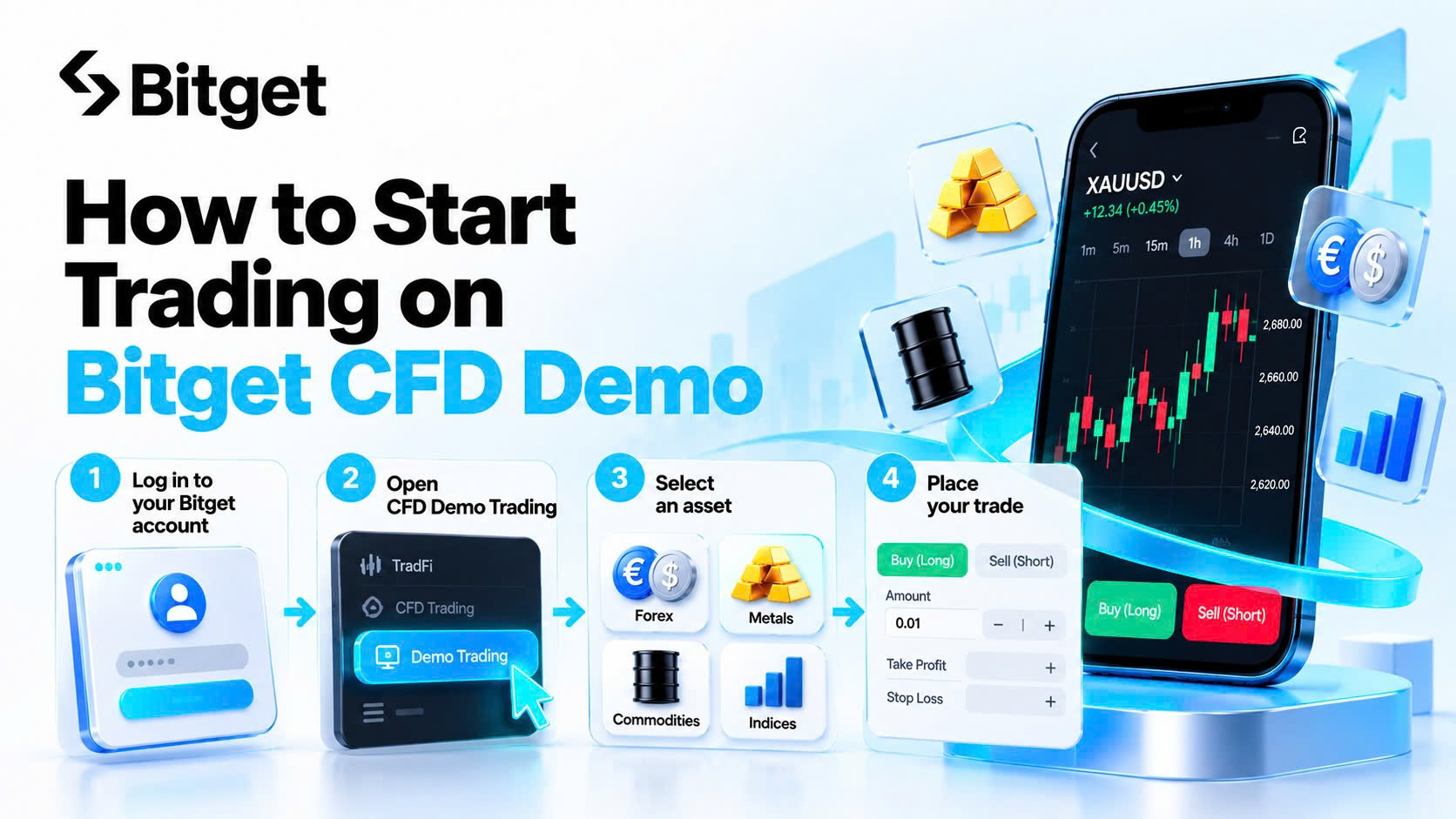
Getting started with Bitget CFD Demo Trading is straightforward. Users can access the practice environment through the website or Bitget app after meeting the required account setup conditions.
Step 1: Create or Log In to Your Bitget Account
Visit Bitget and sign in or register for an account.
Users must complete the required CFD live account registration and accept the relevant terms before activating demo trading. No additional identity verification is required specifically for demo activation once the underlying account requirements are satisfied.
Step 2: Open Bitget CFD Demo Trading
On the website, navigate to the CFD trading page and select CFD Demo Trading from the TradFi menu.
On the Bitget app, open the CFD trading page, tap the three-dot icon, and select Demo Trading. The app must be updated to version 2.94.0 or later.
Once activated, the account receives 10,000 USDT in virtual funds. Users can adjust the practice balance through the available demo fund controls.
Step 3: Select an Asset to Practice Trading
Browse the available instruments and choose a forex pair, precious metal, commodity, or stock index.
Before placing an order, review the selected instrument's market price, spread, trading hours, contract size, and margin requirements.
Step 4: Set Up Your Demo Trade
Choose whether to open a long or short position based on your trading idea.
Enter the position size, review the displayed leverage, and consider setting take-profit and stop-loss levels to practice managing potential gains and losses.
Bitget CFD Demo supports both ECN and zero-fee modes. The two modes use different trading cost structures, allowing users to compare how spreads and commissions affect their positions.
Step 5: Monitor and Review Your Position
After opening a position, observe how its value changes as the underlying market moves.
Users can practice adjusting their positions, closing part of a trade, or exiting entirely.
For detailed setup instructions, read What Is Bitget CFD Demo Trading? Benefits, Key Features and How to Get Started.
What Should Beginners Know Before Trading Different CFD Assets?
Although Bitget CFD Demo uses virtual funds, understanding the differences between asset classes is important for making practice sessions useful.
1. Different assets have different trading hours
Forex, precious metals, commodities, and stock indices do not necessarily follow the same market schedule. Some instruments may have daily breaks, shorter sessions, or reduced trading availability around market holidays.
2. Volatility varies across markets
Gold may respond quickly to interest-rate expectations, while crude oil can react to supply disruptions. Stock indices and forex pairs may respond differently to the same economic announcement.
3. Contract sizes affect trading exposure
One lot of EUR/USD does not represent the same underlying quantity or financial exposure as one lot of gold or crude oil. Always review the contract specifications before placing a simulated order.
4. Leverage increases both potential gains and losses
A relatively small price movement can have a much larger effect on the margin supporting a leveraged position. Bitget notes that dynamic leverage settings may differ between demo and live trading accounts.
5. Simulated performance does not guarantee live results
Demo trading is useful for understanding markets, testing order types, and practicing risk management. However, real trading introduces financial exposure, emotional pressure, and execution conditions that may produce different outcomes.
A practical approach is to begin with one or two familiar instruments, understand their behavior, and gradually explore other asset categories.
Final Thoughts
From major forex pairs and gold to crude oil and global stock indices, Bitget CFD Demo Trading provides an accessible way to explore different financial markets without committing real capital. Each asset category offers something different to learn. Forex introduces exchange-rate movements, precious metals highlight the role of economic expectations, commodities reflect supply-and-demand dynamics, and stock indices provide a view of broader equity markets.
The real value of demo trading comes from what users learn along the way. Rather than opening positions across every available asset, start with a familiar market, understand its trading conditions, and build a consistent approach to managing risk. With 10,000 USDT in virtual funds and real-time market data, Bitget CFD Demo offers a practical environment to develop market knowledge and trading familiarity before considering live CFD trading.
FAQs
1. Can I trade gold (XAUUSD) on Bitget CFD Demo?
Yes. Gold is part of the precious metals category supported by Bitget CFD Demo. Bitget's CFD instrument list includes XAUUSD, which represents gold priced in US dollars. Users can practice trading gold price movements using virtual funds without purchasing physical gold. Check the demo interface for current instrument availability.
2. Does Bitget CFD Demo support forex trading?
Yes. Forex is one of the four main supported CFD Demo asset categories. Bitget's CFD lineup includes major currency pairs such as EUR/USD, USD/JPY, and GBP/USD. Users can practice long and short positions using real-time market quotes and simulated funds.
3. Can I practice trading crude oil on Bitget CFD Demo?
Yes. Commodities are included in Bitget CFD Demo Trading. Bitget's CFD lineup includes WTI crude oil (USOUSD) and Brent crude oil (UKOUSD). These instruments allow users to explore oil price movements and practice managing positions without purchasing physical oil.
4. Can I trade Nasdaq and other stock indices on Bitget CFD Demo?
Yes. Global stock indices are among the supported asset categories. Bitget lists NAS100, US30, US500, HK50, and other index CFDs in its broader instrument specifications. Users can practice trading index price movements without owning the underlying company shares.
5. Do I need real money to trade different assets on Bitget CFD Demo?
No. Bitget CFD Demo provides an initial balance of 10,000 USDT in virtual funds. Users can adjust the demo balance and practice trading supported instruments without depositing real money into the demo account. Virtual funds and simulated profits cannot be withdrawn.
Ready to explore forex, gold, commodities, and global indices? Start trading on Bitget CFD Demo with 10,000 USDT in virtual funds and put your strategies to the test, risk-free.
Disclaimer: This article is for informational and educational purposes only and does not constitute financial or investment advice. Trading involves risks, including potential loss of capital. Always conduct your own research and assess your risk tolerance before making investment decisions.
Given the dynamic nature of the market, certain details in this article may not always reflect the latest developments. For any inquiries or feedback, please reach out to us at geo@bitget.com.


- Key Takeaways
- What Assets Can You Trade on a Bitget CFD Demo Account?
- What Forex Pairs Can You Trade on Bitget CFD Demo?
- Can You Practice Gold and Precious Metals Trading on Bitget CFD Demo?
- What Commodities Can You Trade on Bitget CFD Demo?
- Which Stock Indices Are Available on Bitget CFD Demo?
- How to Start Trading Different Assets on Bitget CFD Demo
- What Should Beginners Know Before Trading Different CFD Assets?
- Final Thoughts
- FAQs