What Is the Difference Between ECN and 0-Fee Mode on Bitget CFD Demo? Fees, Spreads and Which to Choose (2026 Guide)
When practicing CFD trading, choosing the right trading mode can make a difference in how you understand trading costs. A smaller spread may look attractive, but what if the trade also carries a commission? On the other hand, does commission-free trading actually mean you pay nothing?
The main difference between ECN and 0-Fee Mode on Bitget CFD Demo is how trading costs are structured. ECN Mode offers tighter raw spreads with separate commissions, while 0-Fee Mode removes trading commissions but generally has wider spreads. Both are available through Bitget CFD Demo Trading, where users can practice with 10,000 USDT in virtual funds and real-time market data. This guide compares their features, fees, and spreads, with practical examples to help you decide which mode better suits your trading approach.
Key Takeaways
-
Bitget CFD Demo supports two trading modes: You can practice with ECN and 0-Fee Mode using virtual funds without affecting your live trading account.
-
ECN Mode offers tighter spreads with separate commissions: It is designed for active traders who prioritize competitive spreads and transparent trading costs.
-
0-Fee Mode provides commission-free trading with wider spreads: You pay no separate trading commission, but trading costs are reflected in the spread.
-
Both modes support real-time market data and simulated trading: You can explore forex, gold, commodities, and global stock indices while testing different strategies.
-
Choosing between ECN and 0-Fee depends on trading frequency, position size, spreads, and total costs: Neither mode is automatically cheaper in every situation.
What Is the Difference Between ECN and 0-Fee Mode on Bitget CFD Demo?
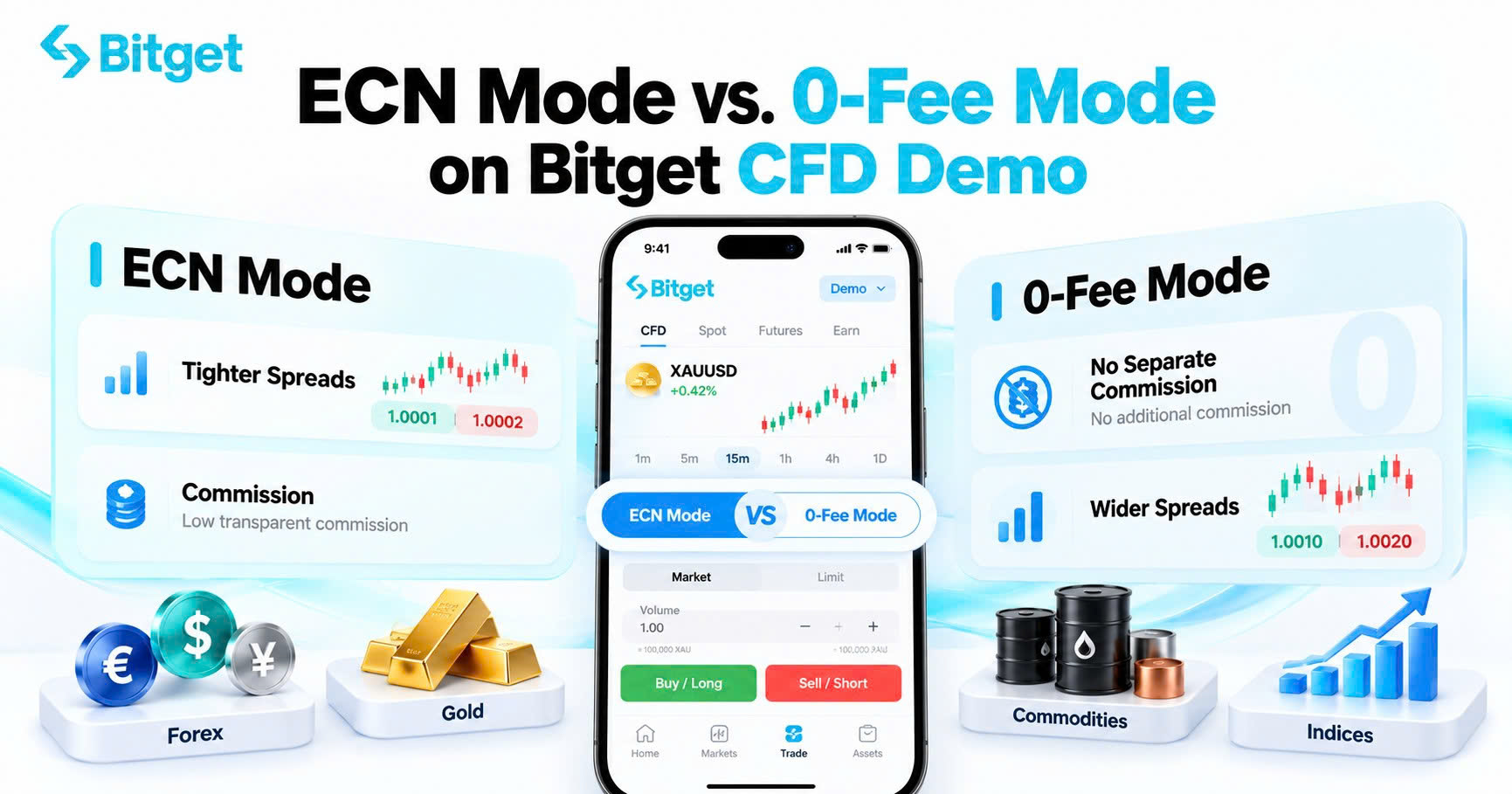
ECN Mode uses raw spreads and charges a separate commission per lot, while 0-Fee Mode charges no separate commission but includes a markup in the spread. This is the primary difference between the two modes available on Bitget CFD Demo.
Both modes allow users to practice opening and closing positions, monitoring market prices, and managing trades without risking real money. However, their pricing structures can affect the simulated cost of entering and exiting a position.
According to Bitget's CFD account mode guide, the key differences are:
| Feature |
ECN Mode |
0-Fee Mode |
| Trading commission |
Charged per lot |
No separate commission |
| Spread |
Raw, typically tighter |
Raw spread plus markup |
| Trading cost structure |
Spread + commission |
Spread-based |
| Overnight swap |
May apply |
May apply |
| Trading symbol example |
XAUUSD |
XAUUSD.s |
| Suitable for |
Active, frequent, and cost-sensitive traders |
Beginners and lower-frequency traders |
| Trading approach |
Short-term and high-frequency strategies |
Simpler commission-free trading |
| Demo trading |
Supported |
Supported |
For example, a trader practicing gold trading may notice that XAUUSD in ECN Mode has a tighter spread than XAUUSD.s in 0-Fee Mode. However, the ECN position also carries a separate commission.
The difference becomes clearer when comparing how each mode calculates trading costs.
What Is ECN Mode on Bitget CFD Demo?
ECN stands for Electronic Communication Network. On Bitget CFD, ECN Mode provides access to raw spreads that are generally tighter than those in 0-Fee Mode, with a separate commission charged based on the instrument and trading volume.
Rather than incorporating the commission into a wider quoted spread, ECN separates the two cost components.
For example, when opening a forex CFD position, the trader needs to consider both the bid-ask spread and the commission charged per lot.
Key Features of Bitget CFD ECN Mode
-
Tighter spreads: ECN uses raw-spread pricing, which may reduce spread costs on frequently traded instruments.
-
Transparent commissions: Trading commissions are calculated separately according to instrument type and lot size.
-
Suitable for active strategies: Traders practicing short-term or high-frequency strategies can study how small spread differences affect their results.
-
Multiple asset classes: Users can practice ECN trading across supported CFD markets, including forex, precious metals, commodities, and indices.
-
Virtual trading environment: ECN trading in the demo account uses simulated funds, allowing users to explore its pricing structure without committing real capital.
Example: Practicing EUR/USD Trading in ECN Mode
Imagine a trader testing a short-term EUR/USD strategy on Bitget CFD Demo.
The trader plans to enter and exit positions frequently, targeting relatively small price movements. Because the strategy involves multiple trades, the cost of each entry and exit becomes important.
With ECN Mode, the trader can observe how a tighter spread affects each position while accounting for the separate trading commission.
For strategies where small price differences matter, this structure may offer advantages. However, the commission still needs to be included when evaluating the total trading cost.
ECN Mode is therefore worth exploring for users who want to understand spread-sensitive trading strategies and detailed transaction costs.
What Is 0-Fee Mode on Bitget CFD Demo?
Bitget CFD 0-Fee Mode allows users to trade without paying a separate trading commission. Instead, trading costs are incorporated into the bid-ask spread, making the fee structure simpler to follow.
Bitget introduced 0-Fee Mode in June 2026 to provide an alternative to its existing ECN pricing model. The mode is designed for users who prefer commission-free transactions and more straightforward trading records.
Unlike ECN Mode, where the trading commission is shown as a separate cost, 0-Fee Mode incorporates a markup into the spread.
Key Features of Bitget CFD 0-Fee Mode
-
Zero separate trading commissions: Users do not pay an additional per-lot trading commission.
-
Simpler pricing structure: The transaction cost is incorporated into the spread.
-
Beginner-friendly: Users can focus on learning how spreads and price movements affect positions without separately calculating commissions.
-
Suitable for lower-frequency trading: Traders who place fewer orders may prefer the simpler cost structure.
-
Available in CFD Demo: Users can practice 0-Fee trading with virtual funds and compare it with ECN Mode.
Example: Practicing Gold Trading in 0-Fee Mode
Suppose a beginner wants to practice trading gold (XAUUSD) after following an important US economic announcement.
The trader selects XAUUSD.s in 0-Fee Mode, reviews the quoted spread, and opens a simulated long position.
Since no separate trading commission applies, the trader can focus on understanding how the spread and gold's price movements affect the position.
If gold rises sufficiently, the position may generate a virtual profit. If the price falls, the trader can observe the simulated loss and practice managing the position.
The simpler cost structure can make 0-Fee Mode a useful starting point for learning CFD trading.
However, there is one important distinction: 0-Fee Mode does not mean completely free trading. Users still face spread costs, and applicable overnight swap charges may affect positions held beyond the daily cut-off time.
How Do Fees and Spreads Compare Between ECN and 0-Fee Mode?
Understanding the difference between commissions and spreads is essential when comparing the two modes.
A trading mode with zero commissions is not necessarily cheaper than one charging a separate commission. The total cost depends on the spread, instrument, position size, and applicable fees.
How Are Trading Commissions Calculated?
In ECN Mode, commissions depend on the number of lots traded and the applicable commission rate.
According to Bitget's official CFD commission guide, the standard published commission rates for VIP2 and below include:
| CFD Category |
ECN Commission per Lot |
| Forex |
$6 |
| Precious metals |
$6 |
| Commodities |
$3 |
| Oil |
$3 |
| JP225 |
$0.10 |
| HK50 |
$1.50 |
| Other applicable contracts |
$3 |
These are published live CFD commission rates. Actual rates may vary by instrument, VIP level, and platform conditions. Users should check the commission displayed in the trading interface. The table is not a separate demo-specific fee schedule.
Bitget calculates commissions using the following formula:
Trading Commission = Number of Lots × Commission per Lot
For example, assuming a $6 commission per lot, opening a 0.5-lot forex position would result in a $3 commission.
In 0-Fee Mode, no separate trading commission applies. Instead, the spread includes the relevant pricing markup.
Why Are ECN Spreads Usually Tighter?
The spread is the difference between the buying price (ask) and selling price (bid) of a trading instrument.
For example, if EUR/USD has a bid price of 1.10000 and an ask price of 1.10010, the spread is 0.00010, or one pip.
In ECN Mode, traders receive raw-spread pricing. In 0-Fee Mode, a markup is added to the raw spread.
This generally makes ECN spreads tighter, although actual spreads can change with market conditions, liquidity, and volatility.
For traders who open and close positions frequently, even small differences in spreads can become meaningful over multiple trades.
Is 0-Fee Mode Always Cheaper Than ECN?
No. Although Bitget CFD 0-Fee Mode does not charge a separate trading commission, its wider spreads can sometimes result in higher total trading costs than ECN Mode.
Consider a hypothetical EUR/USD transaction involving one standard lot, equivalent to 100,000 EUR.
Assume that one pip is worth approximately $10.
| Cost Component |
ECN Mode |
0-Fee Mode |
| EUR/USD spread |
0.5 pip |
1.2 pips |
| Spread cost |
$5 |
$12 |
| Trading commission |
$6 |
$0 |
| Total illustrative cost |
$11 |
$12 |
Note: These figures are hypothetical and do not represent current Bitget spreads or guaranteed demo trading conditions. The illustration assumes unchanged market prices and excludes slippage, overnight swaps, and other potential charges.
In this example, ECN Mode costs $11, while 0-Fee Mode costs $12.
Despite charging a separate commission, ECN is slightly cheaper because its spread is narrower.
However, the result could be different if market spreads change or another instrument is selected.
The key lesson is simple: Compare the total trading cost, not just the commission.
Which Is Better on Bitget CFD Demo: ECN or 0-Fee Mode?
Neither ECN nor 0-Fee Mode is universally better. The most suitable option depends on how frequently you trade, which instruments you use, and how you prefer to manage trading costs.
When Should You Choose ECN Mode?
ECN Mode may be worth practicing if you:
-
Frequently open and close short-term positions.
-
Want to explore scalping or other spread-sensitive strategies.
-
Prefer tighter spreads with separately calculated commissions.
-
Need to understand how commissions affect trading results.
-
Want to evaluate trading costs across different lot sizes.
For example, someone practicing multiple short-duration trades on EUR/USD may find it useful to compare raw spreads and commission costs over a series of transactions.
ECN Mode makes those cost components easier to evaluate separately.
When Should You Choose 0-Fee Mode?
0-Fee Mode may be more suitable if you:
-
Are new to CFD trading.
-
Prefer a simpler commission-free pricing structure.
-
Trade less frequently.
-
Want to practice gold, forex, or index strategies without calculating separate trading commissions.
-
Are still learning how spreads and position sizes affect trading results.
For instance, a beginner practicing one or two gold trades per day may appreciate having fewer individual fee components to track.
However, users should still review spreads and potential overnight financing costs before entering positions.
The advantage of Bitget CFD Demo is that you can explore both modes using virtual funds. Rather than choosing based only on descriptions, you can compare their pricing structures under different market conditions and learn which better suits your trading approach.
How to Switch Between ECN and 0-Fee Mode on Bitget CFD Demo
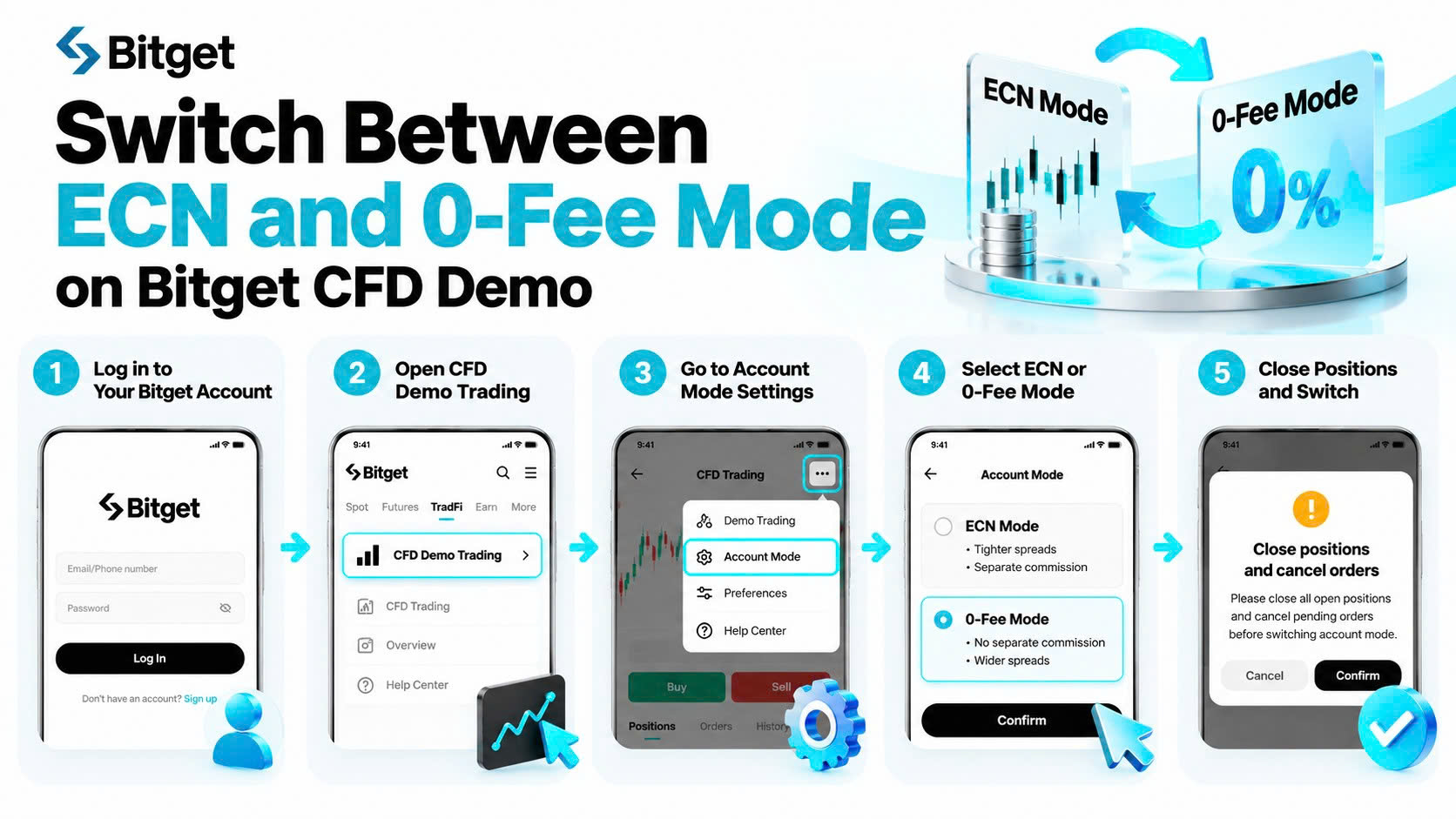
Bitget supports both ECN and 0-Fee Mode within its CFD Demo environment. The modes operate independently from live trading, so demo trading activity does not affect real account positions or balances.
To access and explore the modes, follow these steps.
Step 1: Log In to Your Bitget Account
Visit Bitget and log in to your account.
You must have completed the required CFD account registration to access the demo trading environment.
Step 2: Open Bitget CFD Demo Trading
On the website, navigate to the TradFi section and select CFD Demo Trading.
On the Bitget app, open CFD trading, tap the three-dot menu, and select Demo Trading. The feature requires app version 2.94.0 or later.
Step 3: Locate Account Mode Settings
Once inside the trading environment, locate the available trading mode controls.
Bitget's general CFD mode-switching guide provides these navigation paths:
-
Website: Go to Account or Preferences and select Account Mode.
-
App: Open TradFi, navigate to the relevant trading page, tap the three-dot menu, and select Account Mode.
The exact navigation may differ in the demo interface.
Step 4: Select ECN or 0-Fee Mode
Choose your preferred mode and follow the displayed instructions.
Bitget's account-mode rules require users to cancel pending orders and close open positions before switching between ECN and 0-Fee Mode.
Step 5: Review the Pricing and Start Practicing
After changing modes, select a supported CFD instrument and review its displayed spread, commission structure, and trading parameters.
You can then begin practicing with virtual funds.
For more details, see the Bitget CFD account mode guide.
How Can You Compare ECN and 0-Fee Mode Using Bitget CFD Demo?
One of the most useful ways to understand the differences is to conduct a simple comparison using the demo account.
Bitget CFD Demo provides an initial balance of 10,000 USDT in virtual funds, which users can adjust to practice different strategies.
Here is a practical approach.
1. Start with the same virtual balance
Use a consistent starting balance so that you can compare results under similar conditions.
2. Choose the same underlying market
For example, select EUR/USD in ECN Mode and EUR/USD.s in 0-Fee Mode, if both are available in your demo instrument list.
3. Compare the spreads
Observe the quoted bid and ask prices in each mode. Since market conditions change, compare the quotes at approximately the same time.
4. Check the trading commissions
Record the separate ECN commission and compare it with the spread-based pricing of 0-Fee Mode.
5. Use equivalent position sizes
Practice with the same lot size and similar trading parameters to make the comparison more meaningful.
6. Review the total trading costs
After closing the simulated trades, examine how spreads and commissions affected the results. If positions were held overnight, include any applicable swap charges.
The goal is not simply to identify which mode produced a higher simulated profit from one trade. Instead, compare multiple transactions and understand how each mode's pricing affects different trading strategies.
Remember that demo accounts may have different leverage configurations from live trading accounts, and simulated execution does not guarantee identical live-market results.
Final Thoughts
The difference between ECN and 0-Fee Mode on Bitget CFD Demo comes down to how trading costs are structured. ECN offers tighter raw spreads with separate commissions, while 0-Fee provides commission-free transactions with wider spreads. Both have their advantages, depending on trading frequency, preferred instruments, and how users want to manage costs. Understanding these differences can help traders make more informed decisions instead of focusing only on whether a commission is charged.
The best way to understand a trading mode is to see how it performs under different conditions. With 10,000 USDT in virtual funds, Bitget CFD Demo gives users the opportunity to explore both pricing structures, compare trading costs, and practice risk management without committing real capital. Whether you are just starting or refining an existing strategy, the experience can help you build a clearer understanding of CFD trading before considering live markets.
FAQs
1. Is ECN or 0-Fee Mode better for beginners on Bitget CFD Demo?
0-Fee Mode may be easier for beginners because it does not charge separate trading commissions and has a simpler pricing structure. However, ECN Mode is also useful for learning how raw spreads and commissions affect trading costs. Beginners can practice both modes using virtual funds.
2. Does Bitget CFD Demo charge commissions in ECN Mode?
ECN Mode uses a commission-based pricing structure. Commissions are calculated according to the trading instrument and lot size. In Bitget CFD Demo, users practice this structure with virtual funds rather than paying commissions from their real account balance.
3. Is Bitget CFD 0-Fee Mode completely free?
No. Bitget CFD 0-Fee Mode does not charge a separate trading commission, but trading costs are incorporated into the spread. Additional costs, such as overnight swap charges, may also apply depending on the instrument and how long a position remains open.
4. Which mode has lower spreads on Bitget CFD Demo?
ECN Mode generally offers tighter spreads because it uses raw-spread pricing. In comparison, 0-Fee Mode includes a markup in the spread to replace the separate trading commission. Actual spreads may vary depending on market liquidity, volatility, and the trading instrument.
5. Can I switch between ECN and 0-Fee Mode on Bitget CFD Demo?
Yes. Bitget CFD Demo supports both modes. Users can select the available account mode through the trading interface. Under Bitget's general CFD switching rules, pending orders must be canceled and open positions closed before the mode can be changed.
6. Can I practice both trading modes without real money?
Yes. Bitget CFD Demo provides 10,000 USDT in virtual funds and supports both ECN and 0-Fee Mode. Users can practice trading supported instruments, observe market movements, and compare cost structures without depositing real funds into the demo account.
7. Does changing my Bitget CFD Demo mode affect my live account?
No. Bitget confirms that CFD Demo account modes operate independently from live trading. Changes to demo mode settings, virtual funds, and simulated positions do not affect live trading positions or balances.
Ready to find your preferred CFD trading mode? Join Bitget and explore ECN and 0-Fee Mode with 10,000 USDT in virtual funds before putting real capital to work.
Disclaimer: This article is for informational and educational purposes only and does not constitute financial or investment advice. CFD trading involves significant risks, including the potential loss of capital. Always conduct your own research and assess your risk tolerance before making investment decisions.
Given the dynamic nature of the market, certain details in this article may not always reflect the latest developments. For any inquiries or feedback, please reach out to us at geo@bitget.com.


- Key Takeaways
- What Is the Difference Between ECN and 0-Fee Mode on Bitget CFD Demo?
- What Is ECN Mode on Bitget CFD Demo?
- What Is 0-Fee Mode on Bitget CFD Demo?
- How Do Fees and Spreads Compare Between ECN and 0-Fee Mode?
- Which Is Better on Bitget CFD Demo: ECN or 0-Fee Mode?
- How to Switch Between ECN and 0-Fee Mode on Bitget CFD Demo
- How Can You Compare ECN and 0-Fee Mode Using Bitget CFD Demo?
- Final Thoughts
- FAQs